Your Ad Here

Saturday, August 23, 2008

Configure Web Logs in Apache

One of the many pieces of the Website puzzle is Web logs. Traffic analysis is central to most Websites, and the key to getting the most out of your traffic analysis revolves around how you configure your Web logs.

Apache is one of the most -- if not the most -- powerful open source solutions for Website operations. You will find that Apache's Web logging features are flexible for the single Website or for managing numerous domains requiring Web log analysis.

Author's Note: While most of this piece discusses configuration options for any operating system Apache supports, some of the content will be Unix/Linux (*nix) specific, which now includes Macintosh OS X and its underlying Unix kernel.

For the single site, Apache is pretty much configured for logging in the default install. The initial httpd.conf file (found in /etc/httpd/conf/httpd.conf in most cases) should have a section on logs that looks similar to this (Apache 2.0.x), with descriptive comments for each item. Your default logs folder will be found in /etc/httpd/logs. This location can be changed when dealing with multiple Websites, as we'll see later. For now, let's review this section of log configuration.

ErrorLog logs/error_log

LogLevel warn


LogFormat "%h %l %u %t \"%r\" %>s %b \"%{Referer}i\" \"%{User-Agent}i\"" combined

LogFormat "%h %l %u %t \"%r\" %>s %b" common

LogFormat "%{Referer}i -> %U" referer

LogFormat "%{User-agent}i" agent


CustomLog logs/access_log combined

Error Logs
The error log contains messages sent from Apache for errors encountered during the course of operation. This log is very useful for troubleshooting Apache issues on the server side.

Apache Log Tip: If you are monitoring errors or testing your server, you can use the command line to interactively watch log entries. Open a shell session and type "tail –f /path/to/error_log". This will show you the last few entries in the file and also continue to show new entries as they occur.

There are no real customization options available, other than telling Apache where to establish the file, and what level of error logging you seek to capture. First, let's look at the error log configuration code from httpd.conf.


ErrorLog logs/error_log

You may wish to store all error-related information in one error log. If so, the above is fine, even for multiple domains. However, you can specify an error log file for each individual domain you have. This is done in the <VirtualHost> container with an entry like this:

<VirtualHost 10.0.0.2>

DocumentRoot "/home/sites/domain1/html/"

ServerName domain1.com

ErrorLog /home/sites/domain1/logs/error.log

</VirtualHost>


If you are responsible for reviewing error log files as a server administrator, it is recommended that you maintain a single error log. If you're hosting for clients, and they are responsible for monitoring the error logs, it's more convenient to specify individual error logs they can access at their own convenience.

The setting that controls the level of error logging to capture follows below.

LogLevel warn

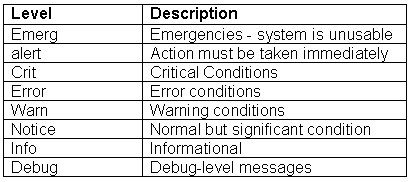
Apache's definitions for their error log levels are as follows:

1299_apachelogstable1 (click to view image)
Tracking Website Activity
Often by default, Apache will generate three activity logs: access, agent and referrer. These track the accesses to your Website, the browsers being used to access the site and referring urls that your site visitors have arrived from.

It is commonplace now to utilize Apache's "combined" log format, which compiles all three of these logs into one logfile. This is very convenient when using traffic analysis software as a majority of these third-party programs are easiest to configure and schedule when only dealing with one log file per domain.

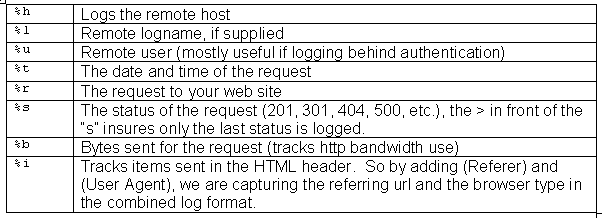
Let's break down the code in the combined log format and see what it all means.

LogFormat "%h %l %u %t \"%r\" %>s %b \"%{Referer}i\" \"%{User-Agent}i\"" combined

LogFormat starts the line and simply tells Apache you are defining a log file type (or nickname), in this case, combined. Now let's look at the cryptic symbols that make up this log file definition.

1299_apachelogstable2 (click to view image)


To review all of the available configuration codes for generating a custom log, see Apache's docs on the module_log_config, which powers log files in Apache.

Apache Log Tip: You could capture more from the HTTP header if you so desired. A full listing and definition of data in the header is found at the World Wide Web Consortium.

For a single Website, the default entry would suffice:


CustomLog logs/access_log combined

However, for logging multiple sites, you have a few options. The most common is to identify individual log files for each domain. This is seen in the example below, again using the log directive within the <VirtualHost> container for each domain.

<VirtualHost 10.0.0.2>

DocumentRoot "/home/sites/domain1/html/"

ServerName domain1.com

ErrorLog /home/sites/domain1/logs/error.log

CustomLog /home/sites/domain1/logs/web.log

</VirtualHost>


<VirtualHost 10.0.0.3>

DocumentRoot "/home/sites/domain2/html/"

ServerName domain2.com

ErrorLog /home/sites/domain2/logs/error.log

CustomLog /home/sites/domain2/logs/web.log

</VirtualHost>

<VirtualHost 10.0.0.4>

DocumentRoot "/home/sites/domain3/html/"

ServerName domain3.com

ErrorLog /home/sites/domain3/logs/error.log

CustomLog /home/sites/domain3/logs/web.log

</VirtualHost>

In the above example, we have three domains with three unique Web logs (using the combined format we defined earlier). A traffic analysis package could then be scheduled to process these logs and generate reports for each domain independently.


This method works well for most hosts. However, there may be situations where this could become unmanageable. Apache recommends a special single log file for large virtual host environments and provides a tool for generating individual logs per individual domain.

We will call this log type the cvh format, standing for "common virtual host." Simply by adding a %v (which stands for virtual host) to the beginning of the combined log format defined earlier and giving it a new nickname of cvh, we can compile all domains into one log file, then automatically split them into individual log files for processing by a traffic analysis package.

LogFormat "%v %h %l %u %t \"%r\" %>s %b \"%{Referer}i\" \"%{User-Agent}i\"" cvh

In this case, we do not make any CustomLog entries in the <VirtualHost> containers and simply have one log file generated by Apache. A program created by Apache called split_logfile is included in the src/support directory of your Apache sources. If you did not compile from source or do not have the sources, you can get the Perl script.

The individual log files created from your master log file will be named for each domain (virtual host) and look like: virtualhost.log.

Log Rotation
Finally, we want to address log rotation. High traffic sites will generate very large log files, which will quickly swallow up valuable disk space on your server. You can use log rotation to manage this process.

There are many ways to handle log rotation, and various third-party tools are available as well. However, we're focusing on configurations native to Apache, so we will look at a simple log rotation scheme here. I'll include links to more flexible and sophisticated log rotation options in a moment.


This example uses a rudimentary shell script to move the current Web log to an archive log, compresses the old file and keeps an archive for as long as 12 months, then restarts Apache with a pause to allow the log files to be switched out.


mv web11.tgz web12.tgz

mv web10.tgz web11.tgz

mv web9.tgz web10.tgz

mv web8.tgz web9.tgz

mv web7.tgz web8.tgz

mv web6.tgz web7.tgz

mv web5.tgz web6.tgz

mv web4.tgz web5.tgz

mv web3.tgz web4.tgz

mv web2.tgz web3.tgz

mv web1.tgz web2.tgz

mv web.tgz web1.tgz

mv web.log web.old

/usr/sbin/apachectl graceful

sleep 300

tar cvfz web.tgz web.old


This code can be copied into a file called logrotate.sh, and placed inside the folder where your web.log file is stored (or whatever you name your log file, e.g. access_log, etc.). Just be sure to modify for your log file names and also chmod (change permissions on the file) to 755 so it becomes an executable.


This works fine for a single busy site. If you have more complex requirements for log rotation, be sure to see some of the following sites. In addition, many Linux distributions now come with a log rotation included. For example, Red Hat 9 comes with logrotate.d, a log rotation daemon which is highly configurable. To find out more, on your Linux system with logrotate.d installed, type man logrotate.

Apache Module mod_log_config

Apache Module mod_log_config

Summary

This module provides for flexible logging of client requests. Logs are written in a customizable format, and may be written directly to a file, or to an external program. Conditional logging is provided so that individual requests may be included or excluded from the logs based on characteristics of the request.


Three directives are provided by this module: TransferLog to create a log file, LogFormat to set a custom format, and CustomLog to define a log file and format in one step. The TransferLog and CustomLog directives can be used multiple times in each server to cause each request to be logged to multiple files.

Custom Log Formats


The format argument to the LogFormat and CustomLog directives is a string. This string is used to log each request to the log file. It can contain literal characters copied into the log files and the C-style control characters "\n" and "\t" to represent new-lines and tabs. Literal quotes and back-slashes should be escaped with back-slashes.


The characteristics of the request itself are logged by placing "%" directives in the format string, which are replaced in the log file by the values as follows:


Format StringDescription
%%The percent sign (Apache 2.0.44 and later)
%...aRemote IP-address
%...ALocal IP-address
%...BSize of response in bytes, excluding HTTP headers.
%...bSize of response in bytes, excluding HTTP headers. In CLF format, i.e. a '-' rather than a 0 when no bytes are sent.
%...{Foobar}CThe contents of cookie Foobar in the request sent to the server.
%...DThe time taken to serve the request, in microseconds.
%...{FOOBAR}eThe contents of the environment variable FOOBAR
%...fFilename
%...hRemote host
%...HThe request protocol
%...{Foobar}iThe contents of Foobar: header line(s) in the request sent to the server.
%...lRemote logname (from identd, if supplied). This will return a dash unless IdentityCheck is set On.
%...mThe request method
%...{Foobar}nThe contents of note Foobar from another module.
%...{Foobar}oThe contents of Foobar: header line(s) in the reply.
%...pThe canonical port of the server serving the request
%...PThe process ID of the child that serviced the request.
%...{format}PThe process ID or thread id of the child that serviced the request. Valid formats are pid and tid. (Apache 2.0.46 and later)
%...qThe query string (prepended with a ? if a query string exists, otherwise an empty string)
%...rFirst line of request
%...sStatus. For requests that got internally redirected, this is the status of the *original* request --- %...>s for the last.
%...tTime the request was received (standard english format)
%...{format}tThe time, in the form given by format, which should be in strftime(3) format. (potentially localized)
%...TThe time taken to serve the request, in seconds.
%...uRemote user (from auth; may be bogus if return status (%s) is 401)
%...UThe URL path requested, not including any query string.
%...vThe canonical ServerName of the server serving the request.
%...VThe server name according to the UseCanonicalName setting.
%...XConnection status when response is completed:


X =connection aborted before the response completed.
+ =connection may be kept alive after the response is sent.
- =connection will be closed after the response is sent.


(This directive was %...c in late versions of Apache 1.3, but this conflicted with the historical ssl %...{var}c syntax.)
%...IBytes received, including request and headers, cannot be zero. You need to enable mod_logio to use this.
%...OBytes sent, including headers, cannot be zero. You need to enable mod_logio to use this.


The "..." can be nothing at all (e.g., "%h %u %r %s %b"), or it can indicate conditions for inclusion of the item (which will cause it to be replaced with "-" if the condition is not met). The forms of condition are a list of HTTP status codes, which may or may not be preceded by "!". Thus, "%400,501{User-agent}i" logs User-agent: on 400 errors and 501 errors (Bad Request, Not Implemented) only; "%!200,304,302{Referer}i" logs Referer: on all requests which did not return some sort of normal status.


The modifiers "<" and ">" can be used for requests that have been internally redirected to choose whether the original or final (respectively) request should be consulted. By default, the % directives %s, %U, %T, %D, and %r look at the original request while all others look at the final request. So for example, %>s can be used to record the final status of the request and %<u can be used to record the original authenticated user on a request that is internally redirected to an unauthenticated resource.


Note that in httpd 2.0 versions prior to 2.0.46, no escaping was performed on the strings from %...r, %...i and %...o. This was mainly to comply with the requirements of the Common Log Format. This implied that clients could insert control characters into the log, so you had to be quite careful when dealing with raw log files.


For security reasons, starting with 2.0.46, non-printable and other special characters are escaped mostly by using \xhh sequences, where hh stands for the hexadecimal representation of the raw byte. Exceptions from this rule are " and \ which are escaped by prepending a backslash, and all whitespace characters which are written in their C-style notation (\n, \t etc).


Note that in httpd 2.0, unlike 1.3, the %b and %B format strings do not represent the number of bytes sent to the client, but simply the size in bytes of the HTTP response (which will differ, for instance, if the connection is aborted, or if SSL is used). The %O format provided by mod_logio will log the actual number of bytes sent over the network.


Some commonly used log format strings are:

Common Log Format (CLF)
"%h %l %u %t \"%r\" %>s %b"
Common Log Format with Virtual Host
"%v %h %l %u %t \"%r\" %>s %b"
NCSA extended/combined log format
"%h %l %u %t \"%r\" %>s %b \"%{Referer}i\" \"%{User-agent}i\""
Referer log format
"%{Referer}i -> %U"
Agent (Browser) log format
"%{User-agent}i"
Note that the canonical ServerName and Listen of the server serving the request are used for %v and %p respectively. This happens regardless of the UseCanonicalName setting because otherwise log analysis programs would have to duplicate the entire vhost matching algorithm in order to decide what host really served the request.

Security Considerations


See the security tips document for details on why your security could be compromised if the directory where logfiles are stored is writable by anyone other than the user that starts the server.

BufferedLogs Directive


Description:Buffer log entries in memory before writing to disk
Syntax:BufferedLogs On|Off
Default:BufferedLogs Off
Context:server config
Status:Base
Module:mod_log_config
Compatibility:Available in versions 2.0.41 and later.


The BufferedLogs directive causes mod_log_config to store several log entries in memory and write them together to disk, rather than writing them after each request. On some systems, this may result in more efficient disk access and hence higher performance. It may be set only once for the entire server; it cannot be configured per virtual-host.

This directive is experimental and should be used with caution.

CookieLog Directive


Description:Sets filename for the logging of cookies
Syntax:CookieLog filename
Context:server config, virtual host
Status:Base
Module:mod_log_config
Compatibility:This directive is deprecated.

The CookieLog directive sets the filename for logging of cookies. The filename is relative to the ServerRoot. This directive is included only for compatibility with mod_cookies, and is deprecated.

CustomLog Directive


Description:Sets filename and format of log file
Syntax:CustomLog file|pipe format|nickname [env=[!]environment-variable]
Context:server config, virtual host
Status:Base
Module:mod_log_config

The CustomLog directive is used to log requests to the server. A log format is specified, and the logging can optionally be made conditional on request characteristics using environment variables.

The first argument, which specifies the location to which the logs will be written, can take one of the following two types of values:

file
A filename, relative to the ServerRoot.
pipe
The pipe character "|", followed by the path to a program to receive the log information on its standard input.

Security:


If a program is used, then it will be run as the user who started httpd. This will be root if the server was started by root; be sure that the program is secure.

Note


When entering a file path on non-Unix platforms, care should be taken to make sure that only forward slashed are used even though the platform may allow the use of back slashes. In general it is a good idea to always use forward slashes throughout the configuration files.

The second argument specifies what will be written to the log file. It can specify either a nickname defined by a previous LogFormat directive, or it can be an explicit format string as described in the log formats section.

For example, the following two sets of directives have exactly the same effect:

# CustomLog with format nickname

LogFormat "%h %l %u %t \"%r\" %>s %b" common

CustomLog logs/access_log common


# CustomLog with explicit format string

CustomLog logs/access_log "%h %l %u %t \"%r\" %>s %b"

The third argument is optional and controls whether or not to log a particular request based on the presence or absence of a particular variable in the server environment. If the specified environment variable is set for the request (or is not set, in the case of a 'env=!name' clause), then the request will be logged.

Environment variables can be set on a per-request basis using the mod_setenvif and/or mod_rewrite modules. For example, if you want to record requests for all GIF images on your server in a separate logfile but not in your main log, you can use:

SetEnvIf Request_URI \.gif$ gif-image

CustomLog gif-requests.log common env=gif-image

CustomLog nongif-requests.log common env=!gif-image


Or, to reproduce the behavior of the old RefererIgnore directive, you might use the following:

SetEnvIf Referer example\.com localreferer

CustomLog referer.log referer env=!localreferer

LogFormat Directive


Description:Describes a format for use in a log file
Syntax:LogFormat format|nickname [nickname]
Default:LogFormat "%h %l %u %t \"%r\" %>s %b"
Context:server config, virtual host
Status:Base
Module:mod_log_config

This directive specifies the format of the access log file.

The LogFormat directive can take one of two forms. In the first form, where only one argument is specified, this directive sets the log format which will be used by logs specified in subsequent TransferLog directives. The single argument can specify an explicit format as discussed in the custom log formats section above. Alternatively, it can use a nickname to refer to a log format defined in a previous LogFormat directive as described below.

The second form of the LogFormat directive associates an explicit format with a nickname. This nickname can then be used in subsequent LogFormat or CustomLog directives rather than repeating the entire format string. A LogFormat directive that defines a nickname does nothing else -- that is, it only defines the nickname, it doesn't actually apply the format and make it the default. Therefore, it will not affect subsequent TransferLog directives. In addition, LogFormat cannot use one nickname to define another nickname. Note that the nickname should not contain percent signs (%).

Example

LogFormat "%v %h %l %u %t \"%r\" %>s %b" vhost_common

TransferLog Directive


Description:Specify location of a log file
Syntax:TransferLog file|pipe
Context:server config, virtual host
Status:Base
Module:mod_log_config

This directive has exactly the same arguments and effect as the CustomLog directive, with the exception that it does not allow the log format to be specified explicitly or for conditional logging of requests. Instead, the log format is determined by the most recently specified LogFormat directive which does not define a nickname. Common Log Format is used if no other format has been specified.

Example

LogFormat "%h %l %u %t \"%r\" %>s %b \"%{Referer}i\" \"%{User-agent}i\""

TransferLog logs/access_log


Friday, August 1, 2008

FreeCharts - AMCharts

Charts — AMCharts

AmCharts is a set of Flash charts for your websites and Web-based products. AmCharts can extract data from simple CSV or XML files, or they can read dynamic data generated with PHP, .NET, Java, Ruby on Rails, Perl, ColdFusion, and many other programming languages.

http://www.amcharts.com/

Open Flash Chart - BEST FREE SWF CHARTS

Open Flash Chart — BEST FREE SWF CHARTS

Open Flash Chart, is open source. It is free to use and you get the source code to fiddle with!

Hello, this is the Open Flash Chart project.

Get graphs like this for free:

How does it work?

  1. User browses to your web site.
  2. The browser downloads the web page which contains the Open Flash Chart.
  3. Open Flash Chart downloads the data file and displays the chart.

When you add Open Flash Chart to your web page, you tell it where to find the data file.

Why is that great?

When the user downloads the web page, Open Flash Chart requests the chart data from the server. The server knows who the user is so it can generate a chart for that particular user showing up to the minute data.

Is it complicated to set up?

You will need to include the Open Flash Chart in your HTML, and you also need to provide the data file on the server. The data file is either a text file, or a .php, Perl, Python, Java (or another flavour of dynamic) page.

For a simple chart you would just drop the data.txt file on your website and point the Open Flash Chart to this URL.

But what we really want is dynamic data that is pulled from a database or calculated or something. To do this you need to create the data file when it is requested. To do this we point the Open Flash Chart to a .php page and this PHP page does your calculations and/or database lookups, then outputs the data file.

To make this a bit easier there are PHP, Perl, Python and Java classes to write the data file for you.

Why only these languages? Well any scripting language will do the same job. But I don’t have access to anything but PHP. If anyone wants to translate the PHP class into a different language, then email me and I’ll post your code and a link to your web site here. The link to your site will be great for your page rank!

And it’s really free?!

Yes. Once upon a time I had to deal with a company who sell flash charting components, their component had a bug that I needed fixing, so I emailed them about it asking when it’d be fixed. (Remember that I had paid real money for this software.) They were so incompetent, rude and obnoxious that after three or four weeks of emails I thought to myself “I could learn Flash and Actionscript and write my own charting component, release it as Open Source, host it on sourceforge and build up a community of helpful coders faster than they can fix a single bug.” And that is what I did. And that is why it is free. I guess the moral of the lesson is: don’t piss off your customers.

REFER: http://teethgrinder.co.uk/open-flash-chart/

Monday, July 28, 2008

Charts For Web Development

Charts For Web Development

This supports all the languages even JavaScript.

Overview

FusionCharts is a flash charting component that can be used to render data-driven animated charts. Made in Adobe Flash 8 (formerly Macromedia Flash), FusionCharts can be used with any web scripting language like HTML, .NET, ASP, JSP, PHP, ColdFusion etc., to deliver interactive and powerful charts. Using XML as its data interface, FusionCharts makes full use of fluid beauty of Flash to create compact, interactive and visually-arresting charts.


Advantages of using FusionCharts

Animated and interactive Charts Using FusionCharts, you can quickly and easily render animated charts that have a lot of interactive options for the end users. Different chart types support different forms of animation and interactivity, thereby providing a different experience to the end users. Easy yet powerful AJAX/JavaScript integration FusionCharts offers advanced options to integrate charts with AJAX applications or JavaScript modules. You can update charts on client side, invoke JavaScript functions as hotspot links, or make dynamic calls for XML data to server without involving any page refreshes. No installation hassles To use FusionCharts, you do not have to install anything on your server. All you need to do is copy paste the SWF files (the core files of FusionCharts) to your server, just like you would do to any image files - and you’re ready to go! So, even on those servers which do not allow installation of ActiveX or any other form of components, FusionCharts can run without any hassles. Easy to use FusionCharts makes the chart creation process a painless experience for you. Since it uses XML as its data, all you need to do is convert your data into XML using a programming language or using the visual GUI provided in FusionCharts - and that’s all what is required to create interactive and animated charts. Runs on a variety of platforms Irrespective of what server side scripting language you’re using, FusionCharts can be used to create charts in that. Since FusionCharts uses XML as the data interface, you can run it on any server and against any scripting language. Also, to view the charts, your users just need to have Adobe Flash Player 8, which is one of the most used browser plugins on the planet. Reduces load on your servers In traditional image based charting systems, the charts are generated as image at the server side. So, for each chart that you need to serve to a user, you’ll have to build complex images on the server and then stream it to the client. When the need of hour is high, this can be an expensive resource on the server, as image creation takes a lot of toll on the server.

FusionCharts brings you great relief - all the charts are rendered at client side using the widely installed Adobe Flash Platform. The server is just responsible for streaming the pre-built SWF files and your XML data files to the end viewers. From there on, Flash Player takes the onus of rendering the charts. Also, the chart SWF Files can be cached so that you can just update the data, and not send chart SWF files every time.

A plethora of chart types FusionCharts v3 offers you a plethora of chart types. From the basic bar, column, line, pie etc. to the advanced combination and scroll charts, you can build all the charts with the same ease of use.


Saturday, July 26, 2008

jQuery.noConflict

Using jQuery with Other Libraries
From jQuery JavaScript Library
Jump to: navigation, search
[edit]
General

The jQuery library, and virtually all of its plugins are constrained
within the jQuery namespace. As a general rule, "global" objects are
stored inside the jQuery namespace as well, so you shouldn't get a clash
between jQuery and any other library (like Prototype, MooTools, or YUI).

That said, there is one caveat: By default, jQuery uses "$" as a shortcut
for "jQuery"
[edit]
Overriding the $-function

However, you can override that default by calling jQuery.noConflict() at
any point after jQuery and the other library have both loaded. For
example:

<html>
<head>
<script src="prototype.js"></script>
<script src="jquery.js"></script>
<script>
jQuery.noConflict();

// Use jQuery via jQuery(...)
jQuery(document).ready(function(){
jQuery("div").hide();
});

// Use Prototype with $(...), etc.
$('someid').style.display = 'none';
</script>
</head>
<body></body>
</html>

This will revert $ back to its original library. You'll still be able to
use "jQuery" in the rest of your application.

Additionally, there's another option. If you want to make sure that jQuery
won't conflict with another library - but you want the benefit of a short
name, you could do something like this:

<html>
<head>
<script src="prototype.js"></script>
<script src="jquery.js"></script>
<script>
var $j = jQuery.noConflict();

// Use jQuery via $j(...)
$j(document).ready(function(){
$j("div").hide();
});

// Use Prototype with $(...), etc.
$('someid').style.display = 'none';
</script>
</head>
<body></body>
</html>

You can define your own alternate names (e.g. jq, $J, awesomeQuery -
anything you want).

Finally, if you don't want to define another alternative to the jQuery
name (you really like to use $ and don't care about using another
library's $ method), then there's still another solution for you. This is
most frequently used in the case where you still want the benefits of
really short jQuery code, but don't want to cause conflicts with other
libraries.

<html>
<head>
<script src="prototype.js"></script>
<script src="jquery.js"></script>
<script>
jQuery.noConflict();

// Put all your code in your document ready area
jQuery(document).ready(function($){
// Do jQuery stuff using $
$("div").hide();
});

// Use Prototype with $(...), etc.
$('someid').style.display = 'none';
</script>
</head>
<body></body>
</html>

This is probably the ideal solution for most of your code, considering
that there'll be less code that you'll have to change, in order to achieve
complete compatibility.

Also see: Custom Alias
[edit]
Referencing Magic - Shortcuts for jQuery

If you don't like typing the full "jQuery" all the time, there are some
alternative shortcuts:

* Reassign jQuery to another shortcut
o var $j = jQuery;
o (This might be the best approach if you wish to use different
libraries)
* Use the following technique, which allows you to use $ inside of a
block of code without permanently overwriting $:
o (function($) { /* some code that uses $ */ })(jQuery)
o Note: If you use this technique, you will not be able to use
Prototype methods inside this capsuled function that expect $ to
be Prototype's $, so you're making a choice to use only jQuery
in that block.
* Use the argument to the DOM ready event:
o jQuery(function($) { /* some code that uses $ */ });
o Note: Again, inside that block you can't use Prototype methods

COmpare DOJO, MOCHI KIT, MOO Tools,Yahoo! UI,Prototype and JQuery

JQuery is the BEST


Dojo   

----


- Built in functionality / Power / ease of use --- many compatibility issues, ease of use -- not good

- add ons / widgets       -- simple -- no widgets

- Size of footprint          ---23KB

- Documentation / Community --- community supported by many companies like IBM, AOL, Sun

Documentation-- not good


Mochikit

---

- Built in functionality / Power / ease of use -- compatibility good, ease of use    -- good

- add ons / widgets       -- not so many , no widgets

- Size of footprint          ---111KB

- Documentation / Community   -- Documentation good, still a little community


MooTools


- Built in functionality / Power / ease of use -- good

- add ons / widgets       -- good

- Size of footprint          ---43KB

- Documentation / Community -- had some good community

Documentation -- good


Yahoo! UI


- Built in functionality / Power / ease of use -- ease of use -- some restrictions to use its functions and more time need to learn the functions

- add ons / widgets       -- ok

- Documentation / Community   --

Community       good

Documentation--Very good docs


Some bugs have to be fixed some compatibility issues


Prototype


- Built in functionality / Power / ease of use

- add ons / widgets       -- ok

- Size of footprint          ---122KB

- Documentation / Community  

Had some community

Documentation--Very good docs

ease of use -- some restrictions to use its functions and more time need to learn the functions

Compatibility fine

Design is not good


Prototype does not provide any widgets or controls


JQuery


- Built in functionality / Power / ease of use

- add ons / widgets       -- good widgets from jquery UI

- Size of footprint          ---26.5 KB

- Documentation / Community  

had lot of communities behind

Documentation--Very good docs

Ease of use -- very good, performance is better that all the other tools

Ease to read and simplified code

Compatibility good except Konqueror


jQuery was the first toolkit to support chaining and that it executes it nicely.


Commnets over comparition

http://programming.reddit.com/info/61xbz/comments


http://mootools.net/slickspeed/

Selectors                                              Prototype 1.6  MooTools 1.2 beta1     JQuery 1.21

IE 6.0 final time (less is better)              2098                1477                1239 

mozilla 1.5 final time (less is better)                    299                  346                  935


From the above results we can see that for IE jquery is better

For prototype some tags are not working


http://www.malsup.com/jquery/form/comp/

This url checks  JQuery,Dojo,Yahoo! UI,Prototype,Mochikit

From the above url we can see that Jquery supports  all the features


Your Ad Here
#chitikatest=doctor